























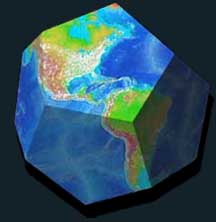
CUT-AND-FOLD DODECAHEDRON AND ICOSAHEDRON MODELS OF EARTH
From NOAA's website, here are a few nice little projects that the kids especially may enjoy. At 12.4 and 11.3 MB, each may take a moment or two to download. But they're worth it! Dodecahedron PDF Icosahedron PDF
EARTH MAP 001
ECLIPTIC & ZODIAC
REFERENCE
SCRIPTS
INSTALLING BONUSES
After downloading a Freebie from SkyMarvels™, you may first have to "unzip" the file or folder you downloaded. A wallpaper, for example, will "unzip" to produce a single JPG file. If "unzipping" your download produces a folder, it will generally contain a "README.txt" file that gives the instructions for installing the Freebie.
ABOUT ADD-ONS AND SCRIPTS
As well as wallpapers, videos and other Bonuses, this page offers Add-Ons and Scripts.
Add-Ons are enhancements that become ongoing parts of your CELESTIA set-up. After you install them, they are available whenever you run CELESTIA (unless you un-install them, of course.) Add-Ons may be Alternate Surface textures, new Cloud Decks, Planetary Rings, new stars or planets, etc.
Scripts are "mini-programs." Run from within CELESTIA, each performs functions that are only accessible when the Script is running. We don't want to confuse things, but we do want to point out 1) that a Script's download can also include add-ons that help the script to function; and 2) currently, CELESTIA only allows you to have one Script running at a time. Be that as it may, Scripts like those in SkyMarvels™ offer powerful features otherwise not available in CELESTIA.
Don't worry if you're not quite sure about how Add-Ons and Scripts differ. After you've used a few, the distinction should become apparent. The most important thing to realize about Add-Ons and Scripts is that they are only limited by your imagination!
ADD-ONS
EARTH MAP 001: ALTERNATE SURFACE
CELESTIA's "Normal" Earth surface-texture, which you probably use most often like the rest of us, can sometimes make it hard to see the lunar shadow move across Earth during solar eclipses. Paths of eclipses are much easier to see with our "Earth Map 001" Alternate Surface, which also provides geopolitical borders and a Latitude and Longitude grid. Even when there is no eclipse, you'll be glad to have this map surface available for reference.
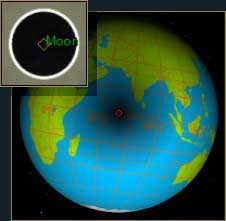
Alternate Surfaces work with CELESTIA 1.4.1 and all later versions. They are very easy to install, the entire process requiring only seconds. As always, all instructions are included. Enjoy! Download Earth Map 001
ECLIPTIC & ZODIAC ADD-ON
The word "Ecliptic" has more than one meaning. The one that pertains to this add-on is the Ecliptic's meaning as the Sun's apparent path through the stars. The Zodiac is the narrowish band of sky that surrounds the Ecliptic, and through which the Sun, the planets and our Moon always move. So the Zodiac is like their "super-highway" in the sky, while the Ecliptic is the "center-lane" which the Sun never leaves.
This add-on displays both the Ecliptic and Zodiac whenever you've turned on CELESTIA's Constellation Borders (called "Boundaries" in 1.6.x.) This helps you not only to quickly "get your bearings" when you are looking at the sky, but also to learn its layout in the first place. You'll soon appreciate the Ecliptic and Zodiac as powerful celestial signposts, which you can consult to guide you on your journeys. Enjoy! Download ECLIPTIC & ZODIAC
Home Intro News Gallery Sky-Gifts Bonuses Tips
Learning Ctr Help Links Credits Legal Contact Us
© 2007-
by Gary M. Winter. All rights reserved.
Interested in political cartoons and humor?
Check out The HIPPLOMATS™.
SkyMarvels: Your Key to the Sky and the Universe! SkyMarvels, Sky Marvels, SkyMarvels.com, FREE SKY MAPS, celestia4all, celestiaforall, CELESTIA, astronomy, space, simulations, animations, downloadable astronomy posters, stars, planets, Inner Planets, Outer Planets, Inferior Planets, Superior Planets, moons, asteroids, comets, Oort Cloud, galaxy, galaxies, Milky Way, Andromeda, globular clusters, binaries, quasars, black holes, supermassive black holes, telescope, telescopes, planetarium, software, freestuff, satellites, add-ons, addons, scripts, eclipses, Solar Eclipses, Lunar Eclipses, Solar Eclipse Finder, Lunar Eclipse Finder, mutual eclipses, transits, occultations, Solar System, CELES-TOOLS, celeSTARrium, CELX, CELX programming, BONUSES, Freebies, multiple views, atronomical unit, light year, parsec, meteors, meteor showers, Perseids, Geminids, Leonids, barycenter, time, Time Zones, tides, alignments, conjunctions, oppositions, seasons, apogees, perigees, aphelion, perihelion, Earth, Luna, Mercury, Venus, Mars, Jupiter, Galilean Moons, Io, Europa, Ganymede, Callisto, Saturn, Titan, rings, Uranus, Neptune, Triton, E-MSpectrum, electromagnetic spectrum, astronaut, equinoxes, solstices, precession, rotation, spin, inclination, tilt, Ecliptic, orbits, ellipse, parabola, hyperbola
PERSONAL USE
SkyMarvels™ Bonuses found on this page are offered for your personal use only. They may not be used for any commercial purpose unless permission is specifically granted in writing by SkyMarvels™. The Bonuses and/or Free Samples on this page from third-parties, (advertisers or others), are governed by those parties and are in no way the responsibility of SkyMarvels™.
Donate safely with: PayPal
and receive one or more Sky-Gifts.
Your support is greatly appreciated!
NOTE: you do not need a
PayPal
account to donate.
FREE SKY MAPS
For free sky maps of tonight's sky, check out our new Sky Viewing page.
Also, download Free SFA Observatory Full-Sky Star Charts PDF
WALLPAPERS
1.) Click on the desired wallpaper to open.
2.) Right Click on image.
3.) Select Save image As...
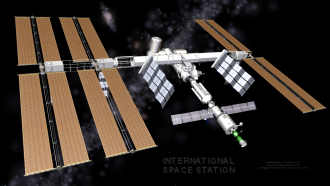
WP 0005: "ISS" (International Space Station)
Download: Standard (4x3)
Download: Wide-Screen (16x9)
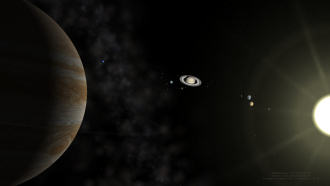
WP 0001: "Solar System"
Download: Standard (4x3)
Download: Wide-Screen (16x9)
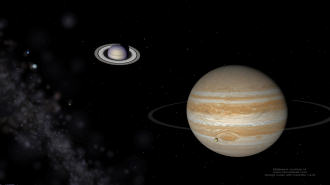
WP 0002: "Outer Planets"
Download: Standard (4x3)
Download: Wide-Screen (16x9)
WP 0003: "Jupiter Triple Simultaneous Solar Eclipse 2013"
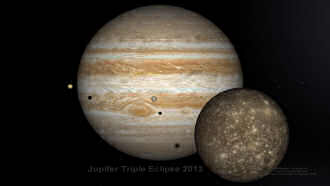
Download: Standard (4x3)
Download: Wide-Screen (16x9)
WP 0004: "Jupiter Triple Simultaneous Solar Eclipse 2014"
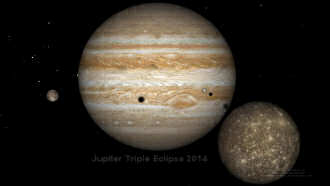
Download: Standard (4x3)
Download: Wide-Screen (16x9)
SCRIPTS
SkyMarvels™ EVENT TIMER
Here's a nice little utility script. Whenever you are running CELESTIA, it lets you determine "and confirm" the durations of events like eclipses, transits—even orbital and rotation periods of planets and stars! The EVENT TIMER works with all versions of CELESTIA which support scripts, and it lets you time events whether CELESTIA's time is running forward or backward! With on-screen notes to guide you, and since CELESTIA gives you an entire universe of events to choose from, you're likely to get endless use out of EVENT TIMER. Enjoy! Download.
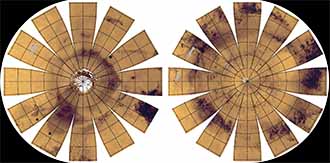
CUT-AND-FOLD MAPS MAKE COOL GLOBE OF MARS AND MORE!
From USGS's website, here are more nice projects that the kids especially may enjoy. Some rectangular maps too! Lots of good stuff here! Cut & Fold Maps

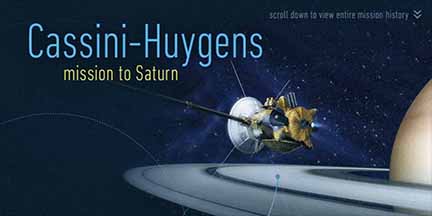
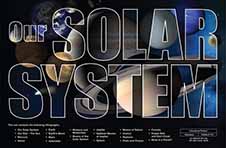 From NASA's site, here's a nice collection of photos and artwork. ATTN: Educators! These make wonderful wall posters for any classroom! Takes several moments to download but well worth it! Hi-Res PDF
CASSINI-HUYGENS:
Mission to Saturn" Poster
image credit: NASA/JPL-Caltech
MAKE A COOL PAPER MODEL OF THE SUN'S STRUCTURE & MORE!
This awesome CANON Website offers free downloads, including one that allows you to produce a surprisingly effective paper model of the Sun's structure! Lots of other cool models can be downloaded too!
VIDEOS
The videos included elsewhere on this site require you to be connected to the internet to view them. However, the generally more abbreviated videos on this page can be downloaded for personal use to your own computer. Enjoy!
PLANET COMPARISON

Compare the relative sizes, inclinations and rotations of the planets and Sun of our own incredible Solar System in this mesmerizing 10-view video. Format: AVI. Resolution: 720 x 576. File: 4.4 MB. Download
STUNNING FIELDS OF VIEW: 002

You've probably never seen a parade of the Inner Planets quite like this! As Mercury, Venus, Earth and Mars float past our view, the hauntingly rich palette of the inner Solar System is revealed. Format: AVI. Resolution: 1280 x 720. File: 2.9 MB. Download
THE MILKY WAY

Our Solar System "resides" in one of the spiral arms of this immense accumulation of hundreds of billions of stars! Format: WMV. Resolution: 640 x 480. File: 3.4 MB. Download
PHASES OF THE MOON

Simultaneous views of 1) the Moon (as seen from Earth) and 2) Earth and the Moon (from above) make it easy to understand how and why our nearest "celestial neighbor" changes shape in our sky every month. Format: AVI. Resolution: 720 x 576. File: 1.5 MB. Download
PHASES OF MERCURY AND VENUS

This clip may be short, but it makes clear why—as they orbit the Sun—the Inferior Planets change their shape as viewed from here on Earth. Format: AVI. Resolution: 720 x 576. File: 1.2 MB. Download
THE SAME SIDE OF THE MOON ALWAYS FACES EARTH

Because Earth and the Moon are "locked by tidal forces," the Moon rotates once each time it orbits Earth. Viewing this, it's easy to understand why we can't see the "far side" of the Moon from Earth. Format: AVI. Resolution: 720 x 576. File: 1.2 MB. Download
REFERENCE
ASTRO-CATALOG PREFIXES
In CELESTIA, you will regularly encounter designations of stars and galaxies from a number of different astronomical catalogs. This list helps you keep them straight. PDF
GREEK ALPHABET
If you don't know the Greek alphabet, you'll want to keep this file handy. It includes CELESTIA's abbreviations which are used in star and galaxy designations. PDF
IMPORTANT ASTRO-VALUES
Here, in one place, are values that we often want to check. PDF
CELESTIA'S TIME-ACCELERATION FACTORS
Here are some everyday "benchmarks" that may help to give you an intuitive sense of the speed of some events when you accelerate time in CELESTIA. PDF
INTENSITY OF SUNLIGHT
How bright does the Sun shine on Mars? Or on a moon of Neptune? PDF